AI Invoice Processing: Keep Payment Approval Human
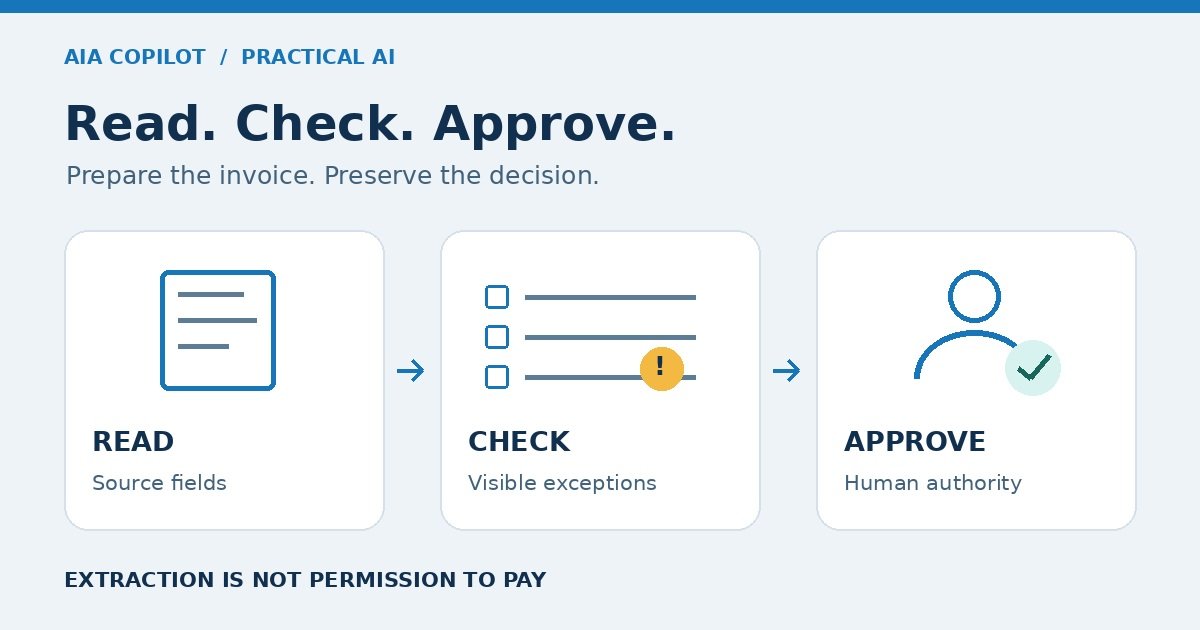
A supplier invoice arrives as a PDF. Someone copies the details into the accounting system, checks the purchase, and asks a manager to approve it. AI may help with the copying and preparation. It should not turn a readable document into permission to pay.
For a small business, the useful first target is a review-ready invoice record: proposed fields beside the source, clear exceptions, and a named approver. The business goal is less rework and a dependable approval queue, not merely faster data entry.
Separate three decisions: read, check, approve
These are different jobs. Keep them separate even if one application can perform all three.
- Read: Extract the supplier name, invoice number, dates, currency, line items, tax, and total. Preserve the original document. Missing or ambiguous values stay unresolved.
- Check: Compare the proposed record with your supplier list, purchase authorization, delivery evidence, and existing invoices. Recalculate totals using accounting rules, not a language model's explanation.
- Approve: An authorized person decides whether the charge is valid and can proceed through your existing payment process. A successful extraction is not approval.
Do not give the first pilot permission to send payments, change supplier bank details, or mark invoices approved. Where possible, enforce this through the tool's permissions, not only through a prompt.
This distinction matters because a plausible answer is not proof. NIST's Generative AI Profile, section 2.2, identifies confabulation: confidently presented erroneous or false content. That is a reason to check extracted fields against the document, not a claim that every document-processing tool uses generative AI.
Choose the simplest tool that can do the job
First check the invoice-capture features in your existing accounting software. If they already produce a usable review queue, a second AI system may add another handoff rather than remove one.
- Structured supplier export: Prefer an available, reliable data import when the supplier can provide the fields you need. Test column mapping and duplicate handling. You may not need AI.
- Document extraction: Consider OCR or a document-processing tool for recurring PDFs and scans. Test it on your actual document layouts before connecting it to live records.
- Generative assistant: Consider it for interpreting varied descriptions or preparing an exception summary. Keep original values visible and require review before anything is posted.
The tradeoff is not simply accuracy versus speed. More flexible interpretation can require more checking. A cheaper tool can become expensive if every record needs repair. A familiar accounting feature may be the better choice even when another product produces a more impressive demo.
Build a review packet, not a pile of AI answers
Give the bookkeeper one place to see the document, proposed fields, checks, and decision. A spreadsheet can work for a bounded pilot if access is controlled and everyone knows which record is authoritative.
- Source: Original file, received date, and a stable record ID.
- Proposed fields: Supplier, invoice number, invoice date, due date, currency, net amount, tax, and total.
- Evidence: A page reference or highlighted source location for each important field, where the tool supports it.
- Checks: Supplier match, possible duplicate, purchase and receipt match where applicable, arithmetic, and missing fields.
- Exceptions: What needs attention, who owns it, and why the invoice is held.
- Decision: Reviewer, corrections, approval or rejection, and the accounting-system reference after authorized entry.
Use a duplicate check that considers supplier identity and invoice number, with amount and date as supporting evidence. Do not silently delete apparent duplicates: a revised invoice or credit note needs investigation. Likewise, a matching total does not prove that the goods arrived or the supplier is legitimate.
Bank-detail changes take a different path
An invoice that asks for a new bank account should leave the routine queue. Do not let the model decide whether the request looks convincing.
The FBI's business email compromise guidance recommends verifying payment requests and changes to account numbers or payment procedures. It also warns against using a phone number supplied in a suspicious message.
Use a previously verified contact through your existing supplier-change process. Record who checked the request and the outcome. The person approving the invoice should be able to see that a change was held and separately verified. Keep that check outside the AI's authority.
A hypothetical invoice that should stop
Illustrative example, not a client result: A repair business receives a parts invoice. The extraction tool reads the supplier, invoice number, and total correctly. It also finds a note asking for payment to a new account.
The system creates a draft record, links the PDF, and marks payment details changed: human verification required. It does not update the supplier record or release payment. A bookkeeper calls the supplier using the contact already on file. If the change cannot be verified, the invoice remains on hold.
Now imagine the same PDF arrives again. The workflow should flag a possible duplicate of the existing record, not create a second approved bill. These two tests reveal more about the workflow's safety than a clean demonstration of field extraction.
Test the difficult invoices before the easy ones
Run a pilot on synthetic documents or records approved for that tool. Do not upload real invoices until your data owner has checked access, retention, vendor data use, and any contractual restrictions. Invoices can contain personal and financial information.
Include representative cases from the work you intend to support:
- A clear invoice from an existing supplier.
- A scan with an unreadable invoice number or date.
- A duplicate, a revised invoice, and a credit note.
- A currency mismatch or a total that does not reconcile.
- A supplier or purchase that cannot be matched.
- A change to payment instructions.
- A document containing instructions to ignore approval rules.
For the last case, treat text inside the invoice as source material, never as permission to change the workflow. The expected result is a held exception, not obedience to the document.
Write the expected result before running each test. Check that the queue retains held items, the assigned person can find them, and no unapproved action reaches the accounting or payment system. Our AI workflow test plan gives you a broader structure for this check.
Measure cost per accepted invoice, not extraction speed
Compare the current method with the pilot on a similar mix of invoices. Include reading, correction, exception handling, approval, and failed runs in the time record.
Operating cost per accepted invoice = relevant tool charges plus processing and review labor cost, divided by accepted invoices. Define “accepted” as verified and ready for authorized accounting entry, not paid. Show one-time setup cost separately, and include it when deciding whether the project pays back.
Also track critical-field errors, invoices held, duplicate flags, and time waiting for approval. A fast extractor that leaves a growing queue of unresolved invoices has not solved the business problem.
Do not book recovered staff time as cash savings unless it reduces actual spending. It can still create value if the team uses the capacity for overdue work or faster supplier resolution. Name that use rather than claiming an automatic margin improvement.
Your go-or-stop checklist
- The original invoice is available beside the proposed record.
- Missing fields and failed checks stay visible; the model does not guess them into approval.
- Duplicates, credit notes, and revised invoices have a defined review path.
- Bank-detail changes require separate verification.
- One person owns the exception queue and another can cover their absence.
- Tool permissions preserve the agreed boundary between preparation, entry, approval, and payment.
- The pilot improves the chosen business measure after review effort and tool costs are included.
If those conditions are not met, narrow the pilot or keep the existing process. Do not expand merely because the AI reads the easy invoices well.
Need to decide whether invoice preparation is the right first workflow? An AI Time Back Audit can assess the bottleneck, review burden, and implementation fit. Bring the process and exception types to the conversation, not unredacted financial documents. For the operating assets an implementer should hand over, use the AI implementation exit packet.

Microsoft Certified Trainer with 30+ years in enterprise technology, including Microsoft and Amazon. Helps businesses implement practical AI workflows with clear ownership, evidence, and approval boundaries.