AI Delegation Map for Small Business: What to Hand Off First
Most small business owners do not need more AI tool lists. They need a practical way to decide what to hand off first. An AI delegation map gives you that decision filter: which work should stay with people, which work should be AI-assisted, and which repeatable steps can become a workflow.
Why Small Businesses Need an AI Delegation Map
AI feels overwhelming because every tool promises to do everything. ChatGPT can write. Copilot can summarize. Zapier can connect apps. Power Automate can move data. CRMs are adding AI. Scheduling tools are adding AI. Accounting tools are adding AI. The result is not clarity. It is decision fatigue.
A delegation map changes the question from "Which AI tool should we buy?" to "Which work should we stop doing manually?" That is the business-first question. It keeps you focused on time saved, response speed, quality, and team capacity instead of features.
For most small businesses, the first AI win should save 3 to 10 hours per week across the owner, admin staff, sales follow-up, or customer service. If the task happens every week, follows a pattern, uses information you already have, and requires review instead of deep judgment, it belongs on the AI delegation shortlist.
Start With Work That Repeats Every Week
The best first AI delegation targets are not dramatic. They are boring, repetitive, and easy to recognize. That is why they work.
Good candidates include:
- Drafting follow-up emails after quotes, appointments, or sales calls
- Summarizing meeting notes into action items and owners
- Turning intake forms into clean customer summaries
- Drafting quote descriptions from job notes
- Preparing weekly owner reports from CRM, inbox, calendar, or invoice data
- Answering common customer questions with approved language
- Organizing messy notes into SOPs, checklists, or training docs
These tasks are good because the human does not disappear. The human reviews, approves, and improves. AI does the first pass. That shift alone can turn a 20-minute task into a 5-minute review.
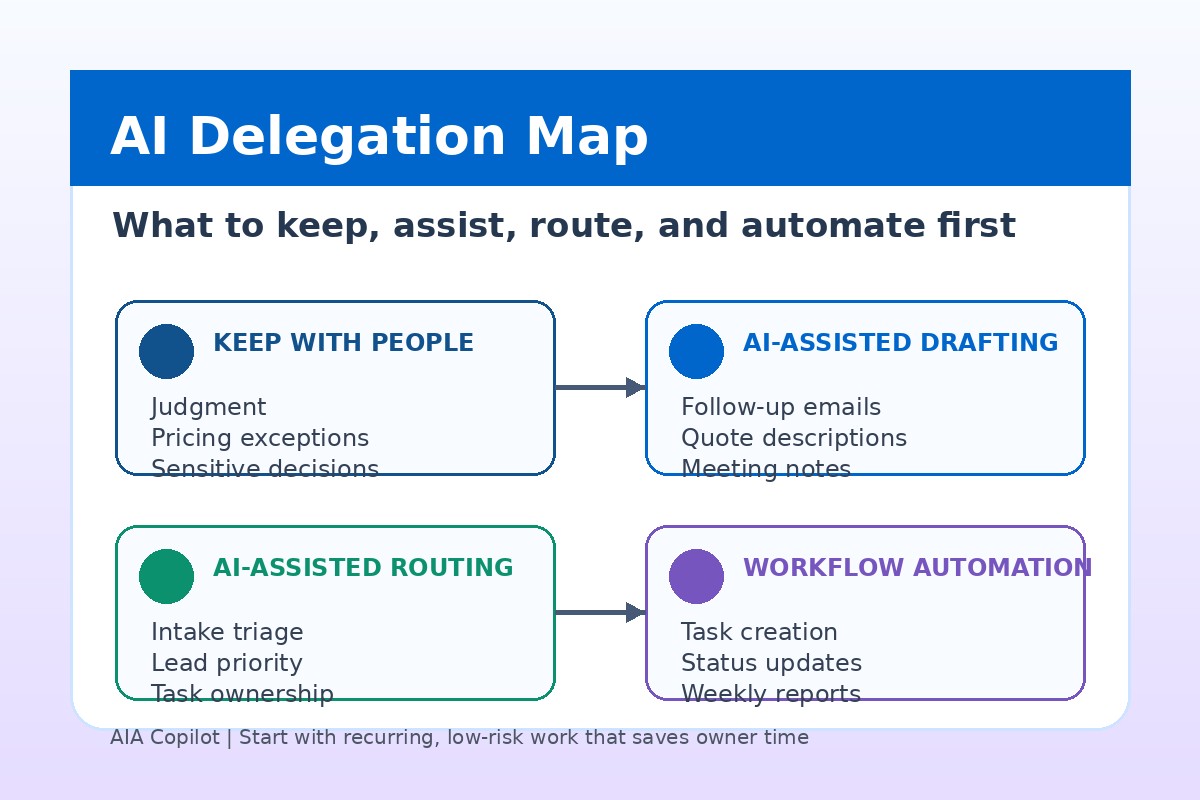
The Four AI Delegation Buckets
Use four buckets when deciding what AI should handle. This keeps the team from over-automating before the process is ready.
1. Keep With People
Keep work with people when it involves trust, judgment, exceptions, or relationship risk. Examples include approving refunds, changing pricing, handling angry customers, diagnosing complex service issues, negotiating contracts, and making hiring decisions.
AI can still help with preparation. It can summarize the background, draft options, or organize facts. But the final call stays with a person.
2. AI-Assisted Drafting
This is the easiest starting point. AI drafts something, and a person reviews it before use. Email replies, quote descriptions, proposals, job summaries, meeting notes, FAQs, social posts, and internal updates all fit here.
If you are brand new, start with this bucket. You can use tools you already have, such as Microsoft Copilot, ChatGPT, Gemini, Claude, or built-in AI in your CRM. The goal is not automation yet. The goal is to reduce blank-page work.
3. AI-Assisted Routing
Routing means AI helps decide where work should go next. A website inquiry becomes sales, support, billing, urgent service, or low priority. A customer email gets tagged for the right person. A call transcript becomes a task for scheduling, estimating, or follow-up.
This bucket is powerful for busy offices because dropped handoffs are expensive. If a $4,000 service request sits in an inbox for two days, the problem is not writing speed. The problem is routing and ownership.
4. Repeatable Work AI Can Handle
This is where AI becomes part of an operating system. A form comes in, AI summarizes it, the system creates a task, the right person gets notified, and a follow-up draft is prepared. The workflow still has review points, but the handoffs are no longer manual.
Do this only after the manual version is clear. If your team cannot describe the current process in plain English, automation will usually make the mess faster instead of better.
Simple AI Delegation Rule
Delegate the first draft, the summary, the categorization, the checklist, or the reminder before you delegate the decision. That gives you time back without handing AI authority it has not earned.
Score Each Workflow Before Buying Tools
Before you buy another AI subscription, score each candidate workflow from 1 to 5 in these five areas:
- Frequency: Does this happen daily or weekly?
- Time drain: Does it cost at least 2 hours per week?
- Pattern: Does the work follow a repeatable structure?
- Risk: Can a person review the output before it reaches a customer?
- Data access: Is the needed information already in email, forms, documents, calendar, CRM, or accounting tools?
A workflow that scores 20 or higher is a strong candidate for your first 30-day AI workflow sprint. A workflow below 15 may still be useful, but it is usually not the best first target.
Example: AI Delegation for a Local Service Business
Consider a plumbing, HVAC, electrical, or appliance repair business. The owner wants to save time, but the team is already busy. They do not need an getting AI working in the business program. They need fewer dropped balls.
The delegation map might look like this:
- Keep with people: pricing exceptions, angry customers, technician judgment, warranty decisions
- AI-assisted drafting: quote follow-ups, customer updates, review requests, service recap emails
- AI-assisted routing: classify new inquiries by urgency, service type, location, and next step
- Using AI to handle repeatable work: new lead creates a task, sends an owner alert, prepares a reply draft, and adds the opportunity to a weekly report
This kind of setup can easily save 5 to 8 hours a week across the owner and office team. More importantly, it improves response speed. Leads get followed up. Customers get updates. The owner sees what needs attention before the week is already slipping away.
Example: AI Delegation for a Professional Service Firm
For accounting firms, law firms, consultants, agencies, coaches, and other professional services, the work is different but the delegation logic is the same.
A practical map might include:
- Keep with people: advice, final recommendations, client-sensitive strategy, legal or financial judgment
- AI-assisted drafting: meeting summaries, client recap emails, proposal drafts, document outlines
- AI-assisted routing: separate new leads, active client requests, billing questions, and document requests
- Using AI to handle repeatable work: intake form summary, task creation, internal prep notes, and follow-up reminders
The value is not replacing professional expertise. The value is protecting that expertise from admin drag. When the firm stops spending senior time on first drafts, reminders, and status summaries, billable and client-facing time increases.
What Not to Delegate First
Some workflows are tempting but poor first moves. Do not start with a customer-facing chatbot that answers everything. Do not start with automatic outbound sales emails to your whole database. Do not start with AI-generated financial advice, legal advice, medical advice, or anything regulated without strong controls.
Also avoid workflows where the process is unclear. If five people do the task five different ways, AI will not fix the inconsistency by itself. Document the process first, then add AI.
Your First 30 Days With an AI Delegation Map
Here is a realistic first month:
- Week 1: list 10 recurring admin, follow-up, reporting, intake, or documentation tasks
- Week 2: score each workflow by frequency, time drain, pattern, risk, and data access
- Week 3: test AI-assisted drafting or summarization on the top workflow
- Week 4: measure time saved, document the review process, and decide whether to automate the handoffs
This gives you a real operating signal before you buy tools or build automations. You will know what AI does well for your business, where review is required, and which workflow deserves implementation support.
Want Your AI Delegation Map Built With You?
AIA Copilot helps business owners rank workflows by commercial impact, readiness, risk, and implementation value, then turn the strongest candidate into a working 30-day plan. Book an AI Time Back Audit and we will map what to keep, assist, route, and automate.
Book an AI Time Back Audit